Rolling countryside and open fields

Complete shoot tracking system

Your team. Your estate.
One clear picture.

GPS trackers, a LoRaWAN gateway, local field hub and KeeperView software—configured together for your shoot. Discuss weather monitoring options as part of your system specification.

Commercially available · Tailored equipment & setup

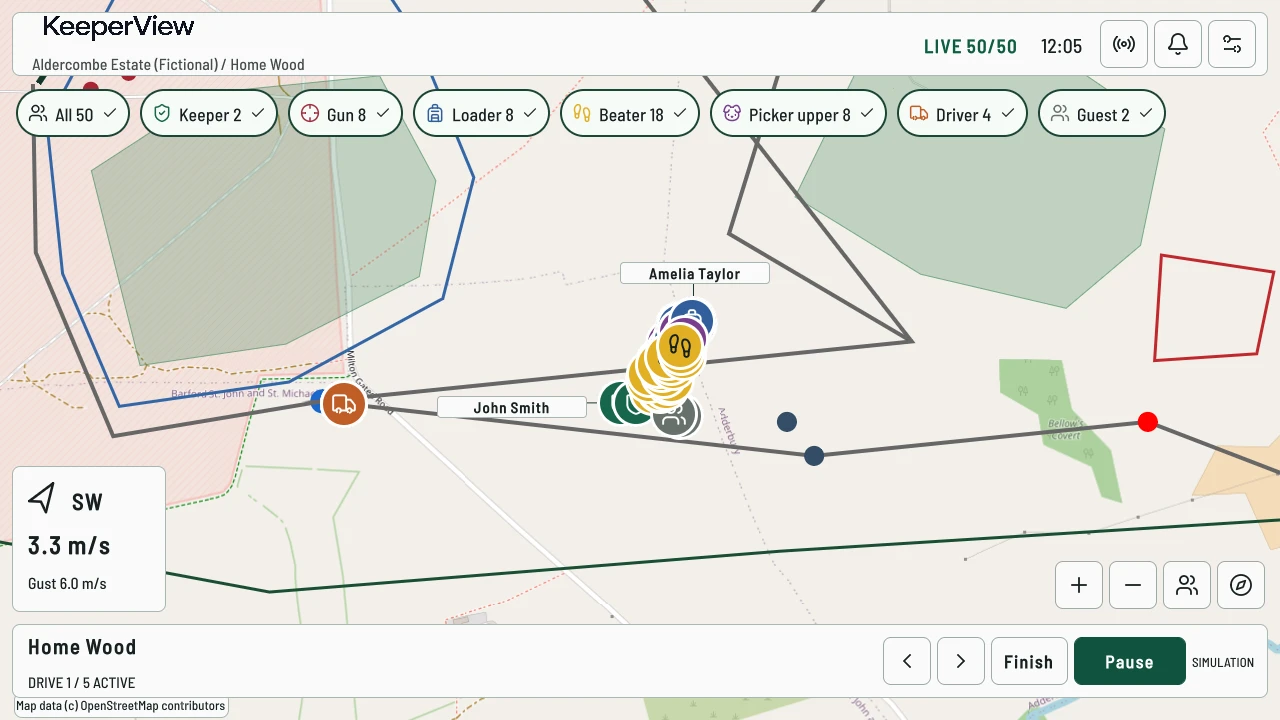
Home Wood drive active with Finish and Pause controls beside the map.
Active drive / demonstration estateDemonstration estate

Equipment & software, together

The complete KeeperView system.

One estate, one coordinated specification. We bring the equipment, management software and setup together so you can focus on running the shoot.

Seeed SenseCAP T1000-E card tracker, photographed on a white background
01 / System component

Personal GPS trackers

With every person, a clearer picture

Portable trackers are assigned to guns, beaters, pickers-up, loaders and other staff. Available position reports help the keeper see the team on the estate map.

Pictured: SenseCAP T1000-E. Photo supplied via The Pi Hut.

Seeed SenseCAP M2 gateway with its external antenna
02 / System component

LoRaWAN gateway

The link across the estate

The gateway receives reports from compatible trackers and connects the radio network to the local field system. Its placement is part of planning your installation.

Pictured: SenseCAP M2 gateway. Photo supplied via The Pi Hut.

Field hub computer with a finned enclosure and network ports
03 / System component

Local field hub

Keep the day close to hand

The field hub processes reports and maintains the shared operational picture locally, so the tracking system does not depend on an internet connection to a cloud service.

Pictured: Local field hub hardware. Photo supplied via OpenELAB.

Seeed SenseCAP S2120 weather station with wind vane, anemometer and sensor housing
04 / Configuration option

Weather station

Weather options for your shoot

Discuss local weather monitoring alongside your tracking requirements. Wind display is supported; station equipment and any automatic connection are specified separately.

Pictured: SenseCAP S2120. Photo supplied via The Pi Hut.

KeeperView console displaying a demonstration estate and simulated participant positions
05 / System component

KeeperView management console

One place to run the day

A tablet-based interface brings estate maps, participant roles, drive controls, available wind readings, alerts and shoot-day records into one working view.

Hardware photographs show the equipment identified in the captions. Console image: demonstration estate with simulated data. Your quotation confirms supplied models, quantities, station connectivity and inclusions.

A clearer shoot day

Everything you need to manage the day.

See the team

View available participant positions across your estate, with the age of each fix kept in context.

Know every role

Keep participant identity, attendance and tracker assignment together without confusing them.

Coordinate each drive

Prepare, start, pause and finish drives from a central management console.

Keep conditions in view

Check wind information alongside the map; discuss weather-station options for your installation.

Respond with context

Receive and review tracking and SOS alerts using your established response procedures.

Work locally

Use a local field system, with equipment and map preparation matched to your estate.

Record and review

Revisit recorded movement, saved-day summaries and the operational log after the shoot.

Bring the work together

Reduce the need to switch between separate tracking, attendance and drive administration processes.

One connected field system

Tracking equipment that works with your console.

Keepers, guns, beaters, pickers-up and support staff can be assigned compatible trackers. Reports pass through the gateway and local hub to the management console.

  1. Personal GPS trackersAssigned to participants
  2. LoRaWAN gatewayReceives radio reports
  3. Local field hubProcesses the shared picture
  4. KeeperView consoleDisplays and manages the day
Tracking reports flow through the local field system. Weather-station connectivity is specified separately; no automatic station link is assumed.

Coverage is assessed for your estate. Tracking needs functioning radio, power and local network links. Weather-station connection and inclusions must be confirmed separately.

See the whole shoot

Equipment in the field. Control in your hands.

Coordinate drives, check roles and available positions, handle tracking and SOS alerts, then revisit the day’s recorded activity. KeeperView supports your procedures; it does not replace keeper judgement or radios where required.

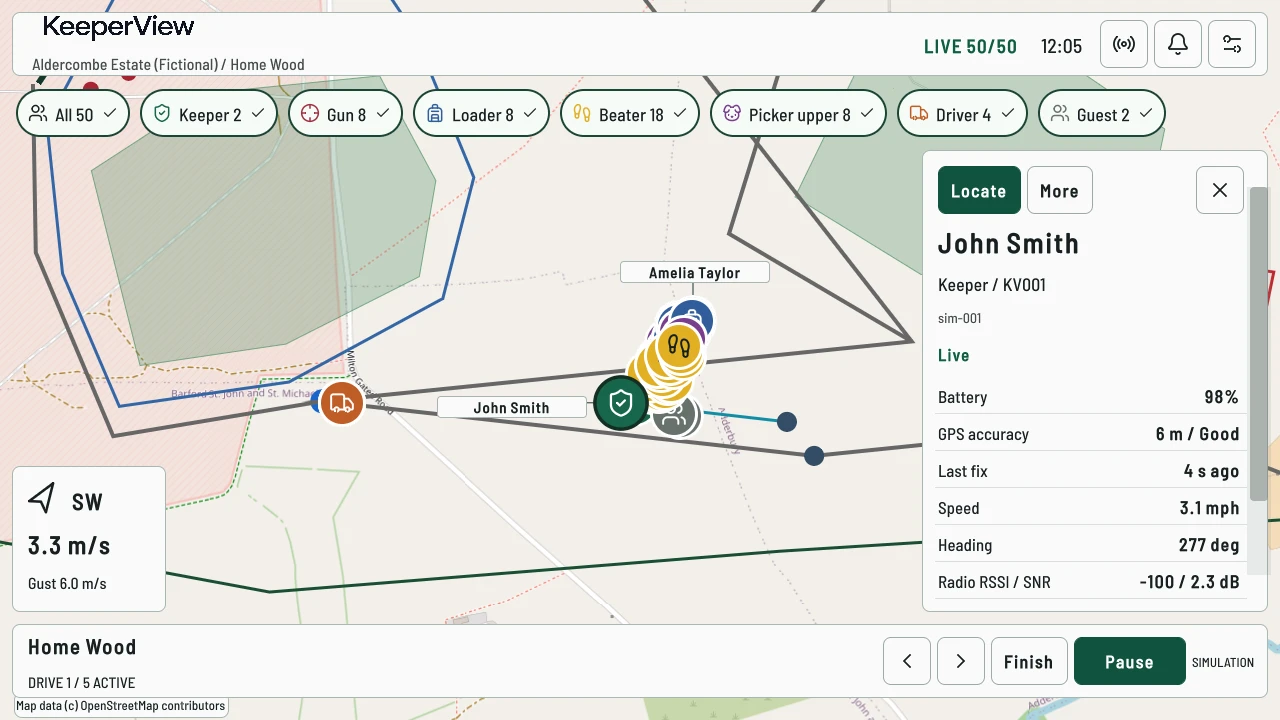
Selected participant with battery, GPS accuracy, fix age and movement details.
Participant details / simulated readingsDemonstration estate

Before you enquire

A system matched to your requirements.

Can I buy a complete KeeperView system?

Yes. KeeperView is commercially available by tailored quotation. We discuss your estate and bring the tracking equipment, local field system, console software and setup into an agreed specification. Your written quotation confirms equipment, services and availability before you order.

What is included in a quotation?

Tracker quantities, compatible gateway and field hub, console requirements, estate configuration and setup are agreed for your installation. Weather-station equipment, map licensing and any additional installation work are identified separately where relevant.

Does KeeperView need an internet connection?

The local field hub can process tracking without a cloud connection. The console still needs its local connection to the hub, and tracking depends on radio reception and powered equipment. Prepare licensed offline map tiles in advance; uncached map areas need internet access.

How far will the trackers work?

There is no universal coverage distance. Terrain, buildings, vegetation, gateway placement and the selected equipment affect reception. Your requirements and proposed coverage need to be assessed for your estate.

Does the weather station connect automatically?

Wind display is supported, and the current software has manual and simulated weather sources. A specific automatic station connection has not been verified in the current system evidence. Station equipment, measurements and any integration must be confirmed in your quotation.

Your tailored system quotation

Tell us about your shoot.

Share your location, approximate team size and what you need to coordinate. We’ll discuss equipment, coverage requirements, configuration and setup.

No fixed prices, automatic orders or payment details. Your written quotation confirms what is supplied and when.

contact@keeperview.co.uk

Request your system quotation

We will use these details to respond to your enquiry. This does not place an order. Please do not include participant location data or sensitive information. Read our privacy information.